Building a CarPlay Video App: When You Don't Own the Screen
Building a CarPlay Video App: When You Don’t Own the Screen
In CarPlay, you do not draw the interface. You describe intent, iOS renders it, and the vehicle decides which capabilities are available.
I built Milepost, a CarPlay video-and-audio app, to understand what engineering a system-owned experience actually demands. It runs on a physical iPhone connected to the standalone CarPlay Simulator: the app supplies a browsing experience, audio uses the car route, and supported video is handed to CarPlay through AirPlay.
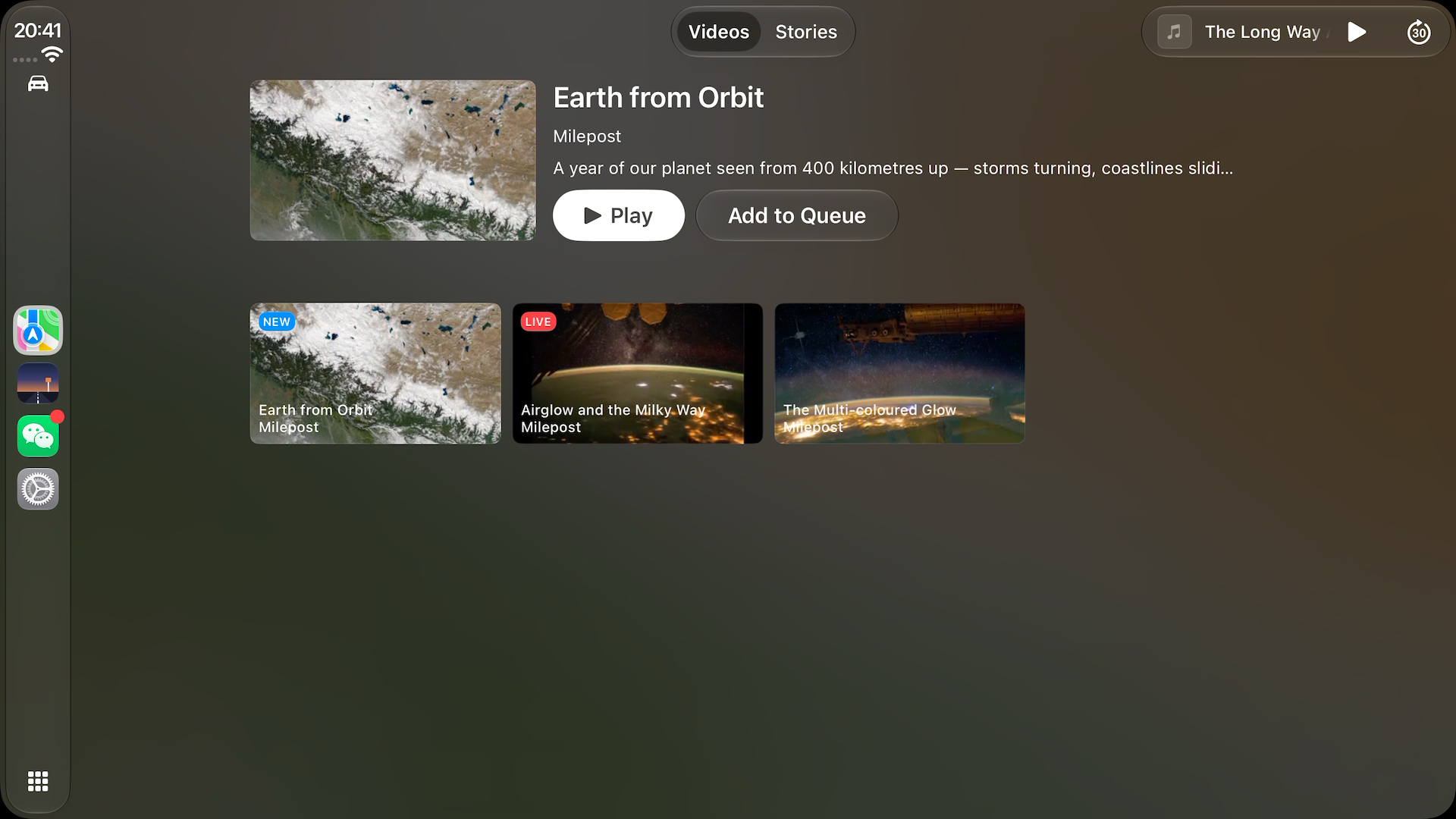
The visible result is a small media app. The interesting work sits below it:
- turning safety and capability rules into testable Swift values;
- keeping the phone scene, CarPlay scene, Now Playing, and hardware commands on one playback truth;
- updating system-owned UI without destroying it; and
- isolating a silent playback failure across CarPlay, AVFoundation, the audio route, and the external receiver.
The project and its 21-rule test suite are on GitHub.
1. CarPlay is a product contract, not another canvas
UIKit and SwiftUI teach us to think in views, layout, and pixels. CarPlay deliberately removes most of that control. An app builds from a fixed set of templates, while the system owns rendering, navigation conventions, input adaptation, and driving-related restrictions.
That tradeoff is the feature. The same app must remain legible on displays with different shapes, resolutions, touch support, knobs, and content limits. It must also complete its useful flows without asking someone to pick up their iPhone. For video apps, the product contract is tighter still: browsing appears only in supported vehicles, and viewing is for times when the car permits it. Apple describes that model in Rev up your CarPlay app and the CarPlay developer resources.
Milepost therefore does not treat video capability as a constant. It is an input to presentation:
1 | |
At connection time, the app reads CPSessionConfiguration.supportsVideoPlayback. The Videos tab is omitted when the receiver cannot support it, and the presentation rules can degrade a video item to audio. I modelled that decision explicitly instead of scattering capability checks through callbacks. In a production build, changes in current video availability would feed the same input rather than require a second UI path.
2. One player, two scenes, several control surfaces
The iPhone window and CarPlay template scene have independent lifecycles, but they run in the same app process. Neither scene should own playback. A process-wide AppEnvironment owns one PlaybackEngine; both scenes observe it.
MilepostKit compiles in Swift 6 mode with complete strict-concurrency checking. The catalogue, commands, state, and presentation specs are Sendable values; AVPlayer, Now Playing, and both UI scenes stay on the main actor. I deliberately did not turn PlaybackEngine into an actor merely to make it sound concurrent: its callbacks and consumers are already main-actor-bound, so doing so would add await to every read without removing a race.
Every control surface then funnels into one command path:
1 | |
The phone UI, CarPlay buttons, MPRemoteCommandCenter, and car hardware all ask the same engine to act. The origin is diagnostic context, not a fork in behavior.
There is a more subtle ownership rule: the player is the source of truth; commands are requests. CarPlay’s system player can pause the underlying AVPlayer without calling my command handler. Route changes and interruptions can do the same. If state only records commands I issued, it becomes fiction as soon as another system surface acts.
Milepost observes timeControlStatus and derives its activity from the player:
1 | |
Treating .waitingToPlayAtSpecifiedRate as active is intentional. A buffering stream has not become paused; changing the button to “Play” during every stall would make the interface lie.
3. Move decisions out of the framework boundary
A live CPInterfaceController is where navigation and rendering behavior becomes observable. If the app makes every decision while constructing CPTemplate objects, most rules can only be verified by connecting a phone and looking at a car display.
I moved those decisions into MilepostKit, a local Swift package that does not import CarPlay. Its presentation layer is made of plain Hashable, Sendable values:
1 | |
TemplateSpecBuilder is a pure function over catalogue, playback state, and car capability. This is the rule at the center of the app:
1 | |
The app target contains a deliberately mechanical adapter from those values to CarPlay’s classes. That boundary lets the tests state product behavior directly:
1 | |
The current result is not a mocked UI test:
1 | |
Those tests cover tab gating, selection behavior, Play/Pause/Resume state, per-item progress, detail-page composition, empty data, and template-depth limits. A particularly useful case guards against applying the current playhead to every card—an easy way to render four videos as “half watched.”
4. System-owned UI changes how you update state
CarPlay failures often collapse into the same symptom: nothing happens. The hardest bugs were not syntax errors; they were broken contracts across lifecycle and presentation boundaries.
A selection can have two owners
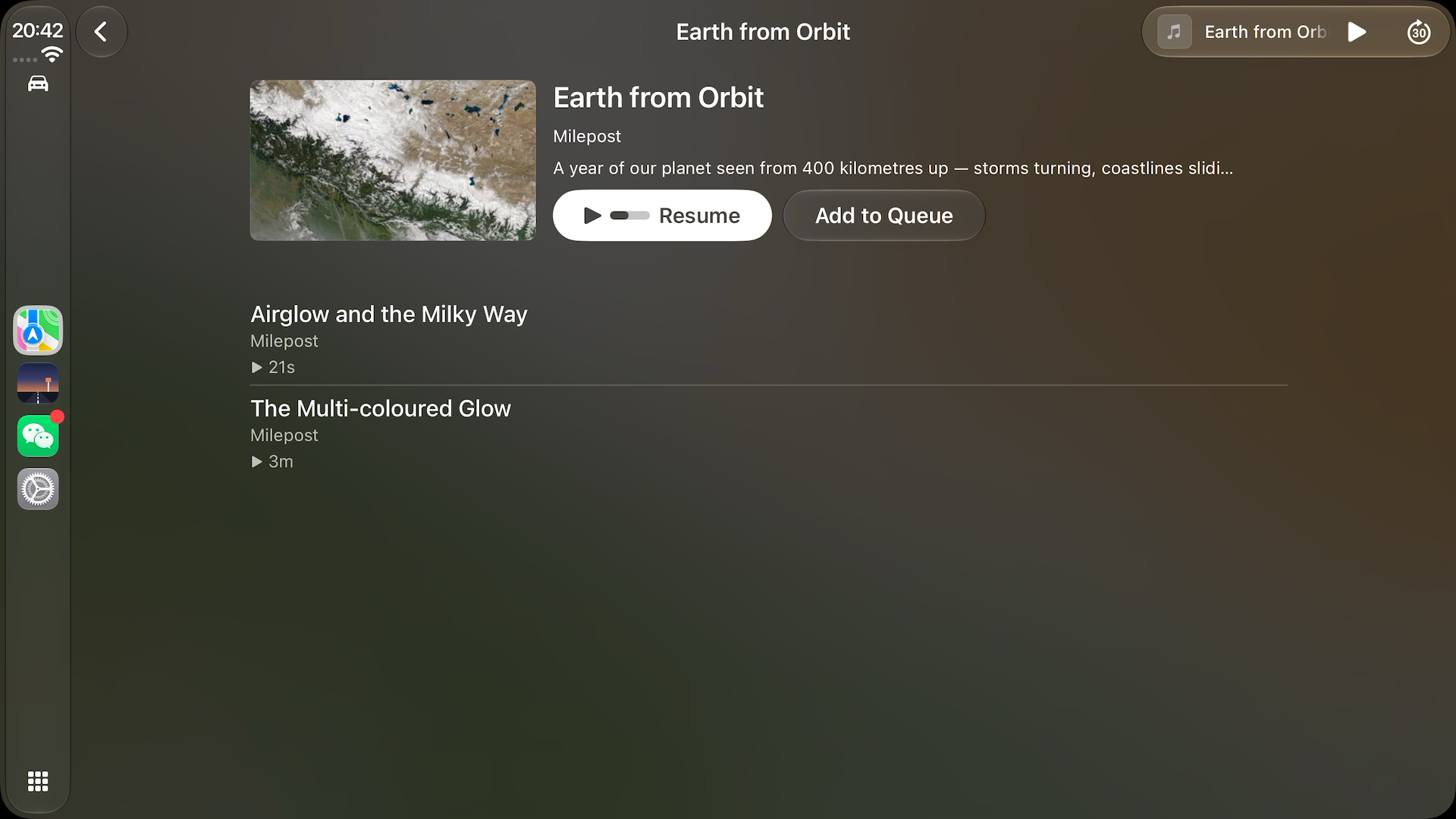
CPPlaybackConfiguration.preferredPresentation sounds cosmetic. It is behavioral. Declaring .video tells CarPlay to present video when the item is selected. My card handler also pushed a detail template, so both the app and system responded to one tap. Whichever transition won the race became the UI.
A card that navigates must use .none; the detail page’s Play button can use .video. Progress and the play/pause glyph are independent, so the card can still communicate playback state without taking ownership of selection.
Rebuilding the root can destroy the thing above it
CPPlaybackConfiguration is a snapshot, so progress and controls need refreshing. My first implementation rebuilt the root template after every playback change. That was correct for my browsing hierarchy and destructive to the system’s video player: iOS presents video over the template stack, and replacing the root tears that stack down.
The fix was to distinguish state changes from structure changes:
1 | |
This also reduces churn. The engine exposes separate observable properties instead of a single monolithic state value, so a view interested only in currentItemID need not invalidate on the twice-per-second elapsed update. Correct ownership and performance pointed to the same design.
Configuration errors do not always announce themselves
Three examples were visually almost identical:
- omitting
CPTemplateApplicationScenefromUISceneClassNameprevented the CarPlay scene from registering; - declaring the ordinary window scene in a SwiftUI-lifecycle manifest interfered with SwiftUI’s own scene ownership; and
- constructing a
CPTabBarTemplatewith no child templates sent the app back to the CarPlay home screen.
The remedy was not another UI abstraction. It was lifecycle logging, an explicit empty state, and completion-handler diagnostics around every push and root transition.
5. Debugging the video handoff by layers
The most valuable investigation began with an unhelpful symptom: browsing worked and audio played, but video never appeared on the CarPlay display.
The first measurements all looked healthy:
1 | |
That evidence ruled out several app-level explanations, but it did not prove the media item was playable. I added one more observation at the AVFoundation boundary and found the real failure:
1 | |
The player itself had no top-level error and remained waitingToPlayAtSpecifiedRate. The route had accepted external playback, but the item failed below it.
At that point I stopped adding hypotheses and changed one variable. With the same app, device, CarPlay session, audio mode, and item metadata, I compared a bundled file:// MP4 with a known-good HTTPS stream:
| Source | Observed result on this iOS 27 CarPlay path |
|---|---|
| Bundled MP4 | AVPlayerItem failed with -11870 / -17226; no video presentation |
| HTTPS media | item became ready, CarPlay entered its system player, and the timeline advanced |
That result does not mean AVPlayer categorically cannot play local MP4 files. It isolates a failure in this external-receiver handoff path and gives the app a practical boundary: prefer remotely streamable video media, while keeping bundled audio as an offline fallback.
1 | |
The lasting lesson is the shape of the trace. I needed evidence at four boundaries: the UI command, CarPlay capability and presentation configuration, AVFoundation routing, and AVPlayerItem readiness. “External playback is active” answered a routing question; it never answered whether the asset could complete the handoff.
6. What I would harden before shipping
Milepost is a focused prototype, not a production video service. The next work is concrete:
- surface
AVPlayerItemfailures to the browsing UI and make retry/fallback behavior explicit; - feed runtime video-availability changes into the existing capability input;
- exercise reconnects, interruptions, route loss, locked-phone access, and weak networks;
- test minimum, standard, wide, and portrait CarPlay displays, plus light/dark appearance and the required image scales; and
- validate on an actual wireless head unit, because the standalone simulator proves integration—not the entire vehicle stack.
That list comes directly from the architecture. The pure builder already makes capability and layout combinations cheap to test; the remaining risk lives at framework, media, and hardware boundaries, so that is where integration coverage belongs.
What I took away
A system UI is still your product. You may not own its pixels, but you own the clarity of the model you give it, the behavior behind every action, and the fallback when a capability disappears.
Boundaries should make decisions easier to test. TemplateSpec is valuable because it turns car-only behavior into ordinary Swift assertions, not because it adds another layer.
Observe the authority, not your requests to it. The player owns playback truth. Commands, buttons, and remote events are competing inputs.
Debug distributed behavior one boundary at a time. A green signal at the routing layer does not prove the media layer succeeded. The decisive evidence is often one observation deeper than the most reassuring metric.
CarPlay made the project interesting precisely because it would not let me own everything. The work was deciding what the app should own—and making those decisions explicit, measurable, and resilient when the system took over.