Building MailPilot: A SwiftUI Prototype for Intelligent Mail Triage
Building MailPilot: A SwiftUI Prototype for Intelligent Mail Triage
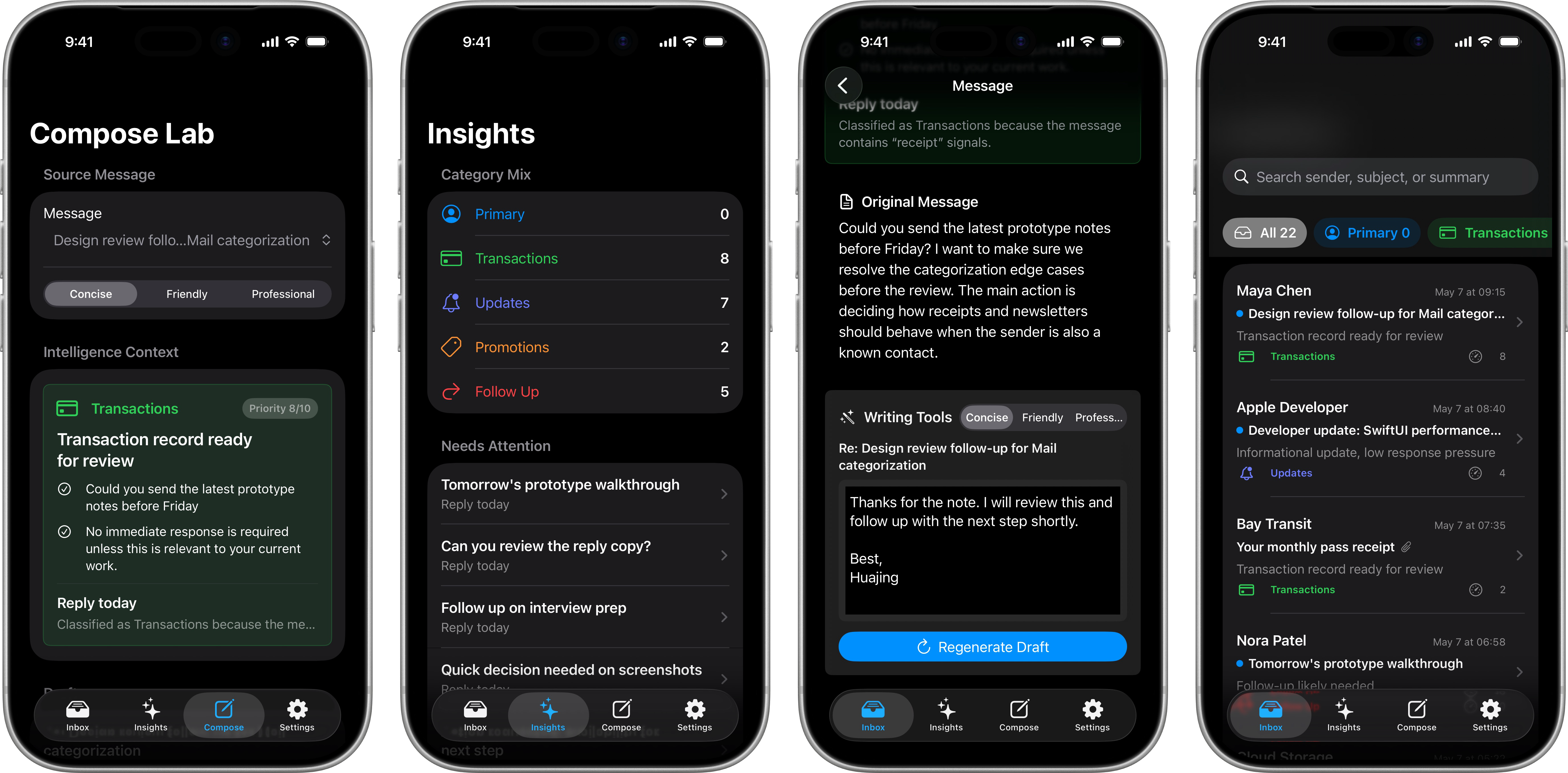
Mail is one of those product surfaces where engineering quality is felt immediately. A good inbox does not just display messages. It helps people understand what matters, decide what needs action, and reply without losing their train of thought.
I built MailPilot as a compact SwiftUI prototype for that problem space. The app demonstrates an intelligent mail workflow with local fixture data, explainable categorization, summaries, priority signals, search, and tone-aware reply drafting.
The project does not connect to a real mailbox. That is intentional. For a portfolio project, I wanted the core experience to be reviewable without OAuth, personal email, server setup, or privacy concerns. The engineering challenge becomes: how do you make a mail intelligence feature feel product-shaped, testable, and Apple-platform native while keeping the demo safe to run?
MailPilot focuses on five workflows:
- Categorizing an inbox into meaningful groups
- Summarizing a message into key points and suggested action
- Explaining why a message was classified a certain way
- Drafting replies in different tones
- Showing follow-up and priority signals across the inbox
Product Goal
MailPilot is a small iOS app for exploring intelligent mail triage. The goal is not to build a full mail client or train a model. Instead, the goal is to show how intelligence can be shaped into a calm, understandable mail experience.
The app has four tabs:
- Inbox: a searchable message list with category chips.
- Insights: category mix, follow-up queue, and priority queue.
- Compose Lab: a reusable drafting surface for reply generation.
- Settings: privacy and architecture notes for the demo.
That structure separates the core reading workflow from aggregate intelligence and writing assistance. It also makes the app easy to demo: start with the inbox, open one message, show the summary and reply draft, then zoom out to the insights view.
Core Data Model
The project uses small value models for messages, summaries, and drafts. The mail category enum is deliberately fixed to five user-facing groups:
1 | |
Those categories mirror common inbox expectations: direct personal mail, receipts, announcements, marketing, and messages that likely need a response.
The message model keeps the demo data close to what a mail UI actually needs:
1 | |
The summary model is where the product behavior becomes visible:
1 | |
I included explanation because classification without reasoning can feel mysterious. In a mail product, trust matters as much as automation. If the app says a message is a follow-up, the user should be able to see why.
Fixture-Driven Mail Data
MailPilot loads bundled JSON fixtures instead of live email:
1 | |
The production demo repository reads MailFixtures.json from the app bundle:
1 | |
This gives the app a realistic inbox with more than twenty messages while keeping the demo deterministic. A reviewer can run the project and see the same results every time.
It also creates a clean future boundary. A real IMAP, Gmail, or on-device mail store adapter could conform to MailRepository without changing the SwiftUI screens.
Intelligence as a Replaceable Service
The intelligence layer is expressed as a protocol:
1 | |
The current implementation is MockMailIntelligenceService. It is deterministic on purpose. The goal is to demonstrate product behavior and architecture, not depend on a network model during a portfolio review.
Classification is simple but explainable:
1 | |
The rules are intentionally small, but the boundary is the important part. In a production version, this service could call an on-device model, an Apple framework, or a private classification engine. The views would not need to know which implementation is behind the protocol.
Explaining Classification
MailPilot does not just show a category chip. It generates a reason:
1 | |
This is a small detail, but it changes the feel of the product. The app is not asking the user to blindly trust a label. It gives a compact explanation that can be scanned in the detail view.
App State with Observation
The app uses a single MailStore as the shared state owner:
1 | |
The root app creates the store once and injects it into the tab hierarchy:
1 | |
This keeps ownership clear. The app owns the repository and intelligence service; the views read state and trigger user actions.
Loading and Summarizing
Loading runs asynchronously and builds summaries after fixture messages are decoded:
1 | |
Even though the mock service returns quickly, the async shape is useful. It makes loading, future cancellation, and eventual real model integration natural.
Inbox Filtering
The inbox supports both text search and category filtering:
1 | |
Including the generated summary headline in search is a small product decision. If a message is summarized as “Follow-up likely needed,” that context should help the user retrieve it.
Category Chips
The inbox uses horizontal chips for fast triage:
1 | |
Each category carries its own symbol and color. The visual design is intentionally restrained: enough color to orient the user, not so much that the inbox becomes noisy.
Message Detail
The detail view is organized around the user’s likely next decision:
- Who sent this?
- What is this about?
- Does it need action?
- Can I reply quickly?
The summary card answers the middle two questions:
1 | |
The full view also shows bullets, suggested action, and explanation. The summary card is designed to be useful even before reading the original message body.
Writing Tools
The reply flow supports three tones:
1 | |
The service produces a draft for the selected tone:
1 | |
The current implementation is rule-based, but the interaction model is what matters: a user can move from triage to response without context switching.
Insights View
The Insights tab shows aggregate state derived from the same summaries:
1 | |
This view is useful in a demo because it shows that classification is not just decoration. It changes how the inbox can be navigated.
Privacy-Friendly Demo Design
MailPilot avoids live mailbox integration for three reasons:
- A reviewer should not need account setup to understand the app.
- The demo should never expose personal email.
- The intelligence behavior should be deterministic for testing.
The Settings tab makes that explicit with three statements:
- No account sign-in
- Fixture data only
- Local deterministic intelligence
That is not just legal safety. It is product judgment. Mail is deeply personal, so a mail intelligence prototype should communicate privacy boundaries clearly.
Testing Strategy
The unit tests focus on app-owned behavior:
- Transaction classification
- Follow-up classification and urgency scoring
- Tone-specific reply drafting
- Search filtering
- Empty inbox behavior
Example:
1 | |
The UI sanity test covers the main demo path: launch, search, open a message, verify summary content, regenerate a draft, and confirm the draft editor appears.
1 | |
The test suite is intentionally focused. It does not try to test SwiftUI itself. It verifies the behavior MailPilot owns.
What This Project Demonstrates
MailPilot is compact, but it demonstrates several production-relevant iOS skills:
- SwiftUI app structure with
TabViewandNavigationStack - Observation-based shared state
- Async loading and service boundaries
- Local JSON fixtures
- Explainable categorization
- Summary and priority modeling
- Tone-aware reply drafting
- Search and filtering behavior
- Privacy-first demo design
- Unit and UI testing
The project is ultimately about product taste as much as code. Intelligent mail features should not feel like a chatbot pasted into an inbox. They should help the user understand, decide, and act with less friction.
That is the design center for MailPilot: a native-feeling mail experience where intelligence is visible, explainable, and useful.