Building FocusFlow: A Smart Notification and Focus Engine for iOS
Building FocusFlow: A Smart Notification and Focus Engine for iOS
Why I Built This
Modern notification systems are not just inboxes. They are real-time attention systems. A useful notification experience has to answer several questions quickly:
- Is this notification relevant right now?
- Should it bypass the current Focus context?
- Should it be delivered immediately, summarized, or suppressed?
- Can the system explain why a delivery decision was made?
I built FocusFlow as an iOS-only SwiftUI demo to explore those problems in a small, interview-ready project. The app simulates a notification pipeline that classifies mock notifications, ranks them by priority and context, summarizes low-priority updates, and updates the UI in real time.
The goal was not to read real system notifications. iOS does not allow third-party apps to inspect every notification on a user’s device, and that limitation is important. Instead, FocusFlow uses deterministic mock notifications to model the underlying engineering challenge: ranking, filtering, summarization, and user attention management.
Product Overview
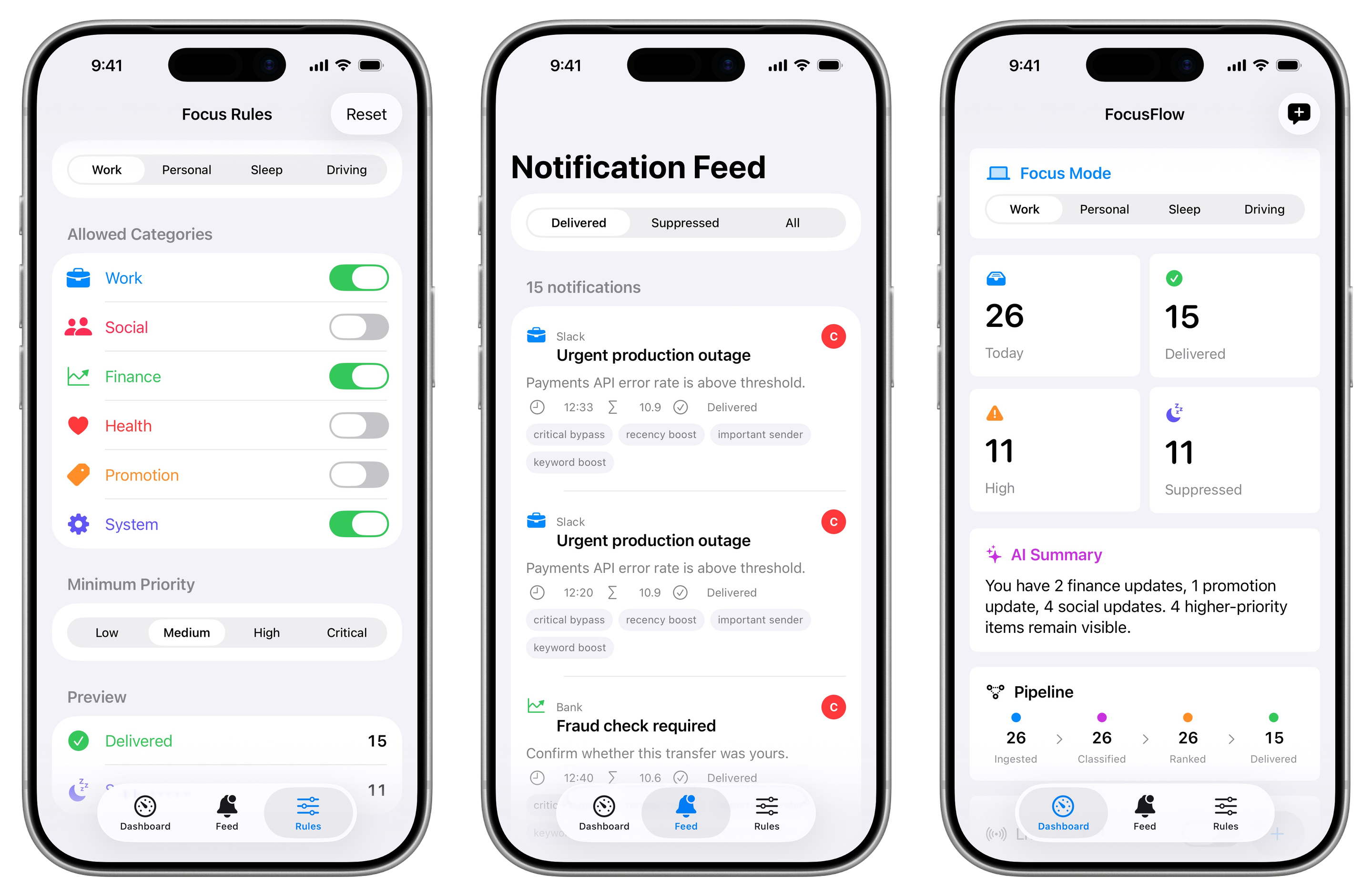
FocusFlow has three main screens:
- Dashboard: Shows the active Focus mode, delivery metrics, suppressed count, local summary, and pipeline status.
- Notification Feed: Shows delivered, suppressed, and all notifications with ranking explanation chips.
- Focus Rules: Lets users edit allowed categories and minimum priority thresholds for each Focus mode.
The app supports four Focus modes:
- Work
- Personal
- Sleep
- Driving
Each mode has a different rule set. For example, Work mode allows work, finance, and system notifications above a medium priority threshold, while Sleep mode only allows critical notifications or categories such as health/system when the threshold is met.
Architecture
FocusFlow uses a practical MVVM structure with separate business-logic engines:
1 | |
The main responsibilities are:
- Models define the notification domain:
AppNotification,FocusMode,FocusRule,Priority,NotificationCategory, andRankedNotification. - Views render the dashboard, feed, and rule editor using SwiftUI.
- ViewModels coordinate UI state.
NotificationCenterModelowns the selected Focus mode, notification list, ranked results, summaries, and metrics. - Engines contain business logic for classification, ranking, and summarization.
- Services handle boundaries such as mock notification generation and
UserDefaultspersistence.
This keeps ranking logic testable and separate from the UI. The views do not decide whether a notification should be delivered; they render the result of the pipeline.
Notification Pipeline
The pipeline is intentionally explicit:
1 | |
The app starts with seeded mock notifications and can also inject new notifications through a manual button or live simulation mode. Every incoming notification goes through the same pipeline:
- Classify category and priority.
- Apply the current Focus rule.
- Allow critical notifications to bypass Focus restrictions.
- Rank delivered notifications.
- Summarize low/medium priority suppressed notifications.
- Refresh dashboard metrics and feed UI.
Ranking Design
The ranking engine combines several signals:
- Priority weight: Critical and high-priority notifications score higher.
- Recency decay: Recent notifications get a freshness boost.
- Sender importance: Important apps/senders receive extra weight.
- Keyword boost: Terms like
urgent,fraud,outage, andapprovalincrease score. - Focus rule match: Category and priority must satisfy the active Focus rule unless the notification is critical.
The delivery rule is:
1 | |
This models a common attention-system pattern: critical events bypass context filters, while everything else must be relevant to the user’s current state.
Explainable Ranking
Each ranked notification exposes explanation chips such as:
critical bypassrecency boostimportant senderkeyword boostbelow thresholdsuppressed
These chips are not just UI decoration. They make the ranking decision debuggable. In a production ranking system, explainability helps engineers understand why an item was delivered, why it was suppressed, and whether a rule or model is behaving unexpectedly.
For example, a bank fraud notification during Sleep mode may still be delivered with critical bypass, while a social update may show below threshold and suppressed.
Focus Rule Editor
The rule editor lets users tune the behavior for each Focus mode:
- Allowed notification categories
- Minimum priority
- Reset to default rules
- Preview delivered vs. suppressed counts
Rules are persisted locally with UserDefaults, which is enough for this MVP. The notifications themselves remain in memory because the demo is focused on pipeline behavior, not long-term storage.
Local Summary Engine
FocusFlow uses a local rule-based summary engine rather than an API call. It groups low and medium priority suppressed notifications by category and generates a short sentence:
1 | |
This gives the product experience of “AI-style summarization” while keeping the MVP offline, deterministic, and easy to demo. A future version could replace the local summary engine with an LLM-backed adapter without changing the rest of the pipeline.
Real-Time UI
The Dashboard includes a Live simulation mode. When enabled, the app injects a new mock notification every few seconds and immediately recomputes:
- Delivered notifications
- Suppressed notifications
- Ranking scores
- Explanation chips
- Summary text
- Pipeline metrics
This helps demonstrate that FocusFlow is not a static notification list. It behaves more like a real-time notification delivery system where each incoming event changes the output of the pipeline.
Testing
The project includes unit tests for the core behavior:
- Focus rule filtering by category and priority
- Critical priority bypass
- Minimum priority thresholds
- Ranking order by priority and recency
- Summary grouping
- Rule persistence and reset
What I Would Build Next
The next version could add:
- A visible ranking score breakdown per notification.
- A timeline view showing how delivery decisions change across Focus modes.
- A synthetic latency metric for each pipeline stage.
- A local JSON export for debugging test scenarios.
- An optional LLM summary adapter behind a protocol while keeping the local summary engine as fallback.
- UI tests for Dashboard, Feed, and Rules workflows.
Takeaway
FocusFlow is intentionally small, but it is built around the real engineering concerns behind notification systems:
- Context-aware delivery
- Priority and relevance ranking
- Critical alert bypass
- Summarization to reduce interruption
- Real-time UI updates
- Explainable decisions
That makes it more than a notification inbox. It is a compact simulation of a system experience problem: helping users receive what matters without overwhelming their attention.